Model channels
A model channel is a provider + API key + endpoint that supplies models to your account. You don't need one to get started — a default chat model is open on every account — but adding your own lets you use a specific provider, your own key, or a private/self-hosted endpoint.
Add a channel
- Open Settings (gear icon, top-right) → Model Service.
- Click + Add channel.
- Pick a provider from the dropdown.
- Enter your API key, and a custom Base URL if needed.
- The platform auto-detects available models for that key.
- Choose the active model for this channel and save.
You can toggle a channel on/off without deleting it, and keep several channels for different providers side by side.
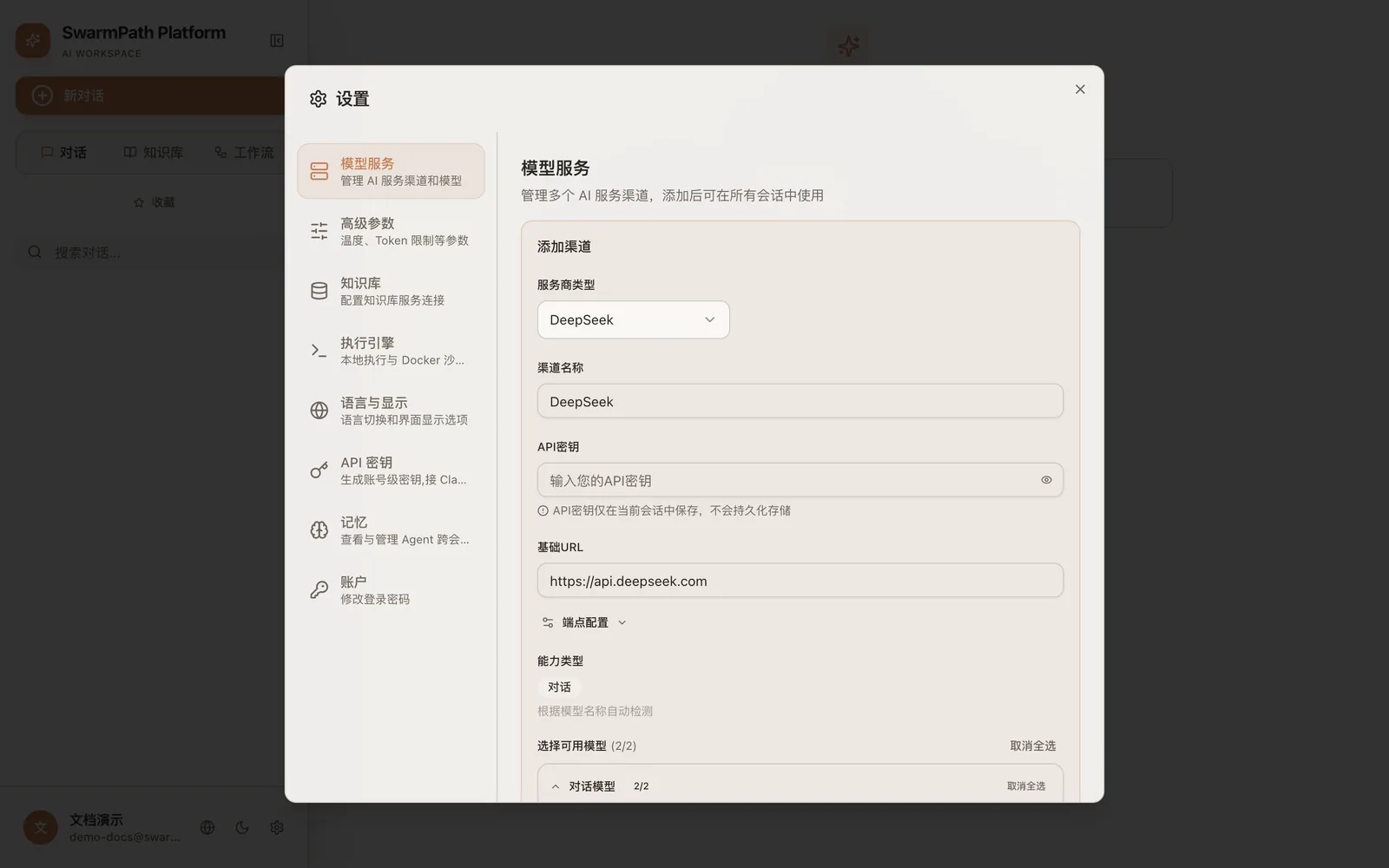 Add channel (shown in Chinese): pick a provider → enter API key + base URL → auto-detect and select models
Supported providers
| Anthropic (Claude) | OpenAI |
| Google Gemini | Azure OpenAI |
| DeepSeek | Kimi (Moonshot) |
| Zhipu (BigModel) | MiniMax |
| DashScope (Alibaba Qwen) | Volcengine |
| Ollama (local) | LM Studio (local) |
| Custom (any OpenAI-compatible endpoint) |
For a custom OpenAI-compatible endpoint, choose Custom, paste the base URL and key, and the platform will list its models.
Choosing the chat model
The model used for a conversation is selected in the chat panel, from the models your channels expose. New accounts start with a default chat model open, so this is optional until you want something else.
The knowledge-base models are platform-wide (not here)
A knowledge base needs three models under the hood:
- Embedding — turns text into vectors for search.
- Rerank — reorders retrieved passages by relevance.
- Contextual — writes a short context prefix for each chunk at ingestion time.
These run on the platform's global defaults and are not configured in your channels. This is deliberate: all projects share one vector store, so the embedding model (and its vector dimensions) must be consistent across every user. Letting each user pick a different embedding model would make existing vectors incompatible. So retrieval "just works" for everyone, with no setup.
Advanced
If a deployment does allow overriding these per-user, it's an administrator setting — a regular account never needs to touch it. Your channels are for the chat model, and for image / speech models if you use those features.
Next
- Knowledge base — build and query one.
- Chat — pick a model and start talking.